

Great content can’t rank if search engines can’t find it, understand it or trust that it is the right version to show. That is the job of technical SEO, and much of it sits squarely in a developer’s hands: server responses, URLs, HTML structure, rendering, performance and structured data.
This guide focuses on the technical SEO essentials that make the biggest difference, based on Google’s own documentation, without the myths and guesswork that often surround the topic.
Key Takeaways
- Make sure important pages can be crawled, rendered and indexed, and that unimportant ones can’t waste attention.
- Use correct status codes, canonical tags and redirects to avoid duplicate and broken pages.
- Serve meaningful HTML from the server where possible, and use real links for navigation.
- Add structured data, keep the site fast and monitor everything in Search Console.
How Search Engines Process Your Site
Google’s process has three main stages, explained in its SEO Starter Guide:
- Crawling: Googlebot discovers URLs by following links and reading sitemaps, then downloads the pages.
- Rendering and indexing: Google processes the page, including running JavaScript, understands its content and decides whether to store it in its index.
- Serving: When someone searches, Google shows the most relevant indexed pages.
Technical SEO is about removing obstacles at each stage.
1. Crawlability
robots.txt
The robots.txt file tells crawlers which parts of your site they may request. Google’s robots.txt introduction explains the syntax.
- Use it to stop crawlers wasting time on areas such as internal search results or admin pages.
- Don’t use robots.txt to hide pages from search results. A blocked page can still be indexed if other sites link to it. Use a noindex directive instead, and make sure the page isn’t blocked, so Google can see the directive.
- Never accidentally block CSS or JavaScript files that Google needs to render your pages.
XML Sitemaps
An XML sitemap lists the URLs you want indexed. Include only canonical, indexable pages that return a 200 status, keep it updated automatically, reference it in robots.txt and submit it in Search Console.
Internal Links
Crawlers discover pages through links. Use standard HTML links with an href attribute (<a href="/page/">). Links triggered only by JavaScript click handlers may not be followed. Make sure every important page is linked from somewhere, and avoid orphan pages.
2. Indexability and Duplicate Content
Status Codes
Return the correct HTTP status code for every URL:
| Code | Meaning | When to Use |
|---|---|---|
| 200 | OK | Normal, working pages |
| 301 or 308 | Permanent redirect | A page has moved for good |
| 302 or 307 | Temporary redirect | Short-term moves only |
| 404 | Not found | The page doesn’t exist |
| 410 | Gone | The page has been permanently removed |
| 5xx | Server error | Something has gone wrong, fix quickly |
Avoid soft 404s, where a “not found” page returns a 200 status, and avoid long redirect chains. Point redirects straight to the final URL.
Canonical URLs
The same content is often available at several URLs, for example with tracking parameters, trailing slashes or upper and lower case variations. Use a rel=”canonical” link to tell Google which version is preferred. Google’s guide to consolidating duplicate URLs explains the options. Canonical tags should point to indexable pages that return a 200 status.
noindex
Use <meta name="robots" content="noindex"> (or the equivalent HTTP header) for pages that shouldn’t appear in search, such as thank-you pages, internal search results or thin tag archives.
URL Structure
Use short, readable, lowercase URLs with hyphens between words, such as /blog/core-web-vitals-explained/. Keep URLs stable. Changing them without redirects loses rankings.
3. JavaScript and Rendering
Google can render JavaScript, but rendering can be delayed and some content may be missed if it depends on user interaction. Google’s JavaScript SEO basics set out the best practices.
- Prefer server-side rendering or static generation for important content, so the HTML already contains the main text, links and metadata.
- Make sure titles, meta descriptions, canonical tags and structured data are present in the rendered HTML.
- Don’t rely on hash fragments (#) for different pages. Use real URLs with the History API.
- Test pages with the URL Inspection tool in Google Search Console to see the rendered HTML Google sees.
Modern frameworks make this easier. Our comparison of Next.js vs Astro vs Nuxt explains their rendering options, and our guide to WordPress vs headless CMS covers SEO considerations for headless builds.
4. On-Page HTML Essentials
- Title tags: Unique, descriptive and concise for every page.
- Meta descriptions: Unique summaries that encourage clicks. Google may rewrite them, but good ones are often used.
- Headings: One clear H1 per page and a logical H2 and H3 structure.
- Images: Descriptive file names, meaningful alt text, defined dimensions and modern formats.
- Language: Set the lang attribute on the <html> element.
Many of these overlap with accessibility requirements. Our guide to website accessibility basics explains why good structure helps everyone.
5. Structured Data
Structured data helps search engines understand your content and can make pages eligible for rich results, such as article information, breadcrumbs, FAQs or product details.
- Use JSON-LD, the format Google recommends.
- Use relevant types from schema.org, such as Article, BreadcrumbList, Organization and Person.
- Only mark up content that is visible on the page.
- Validate with Google’s Rich Results Test.
Google’s introduction to structured data lists the supported features. Structured data doesn’t guarantee rich results, but correct markup makes them possible.
6. Performance and Page Experience
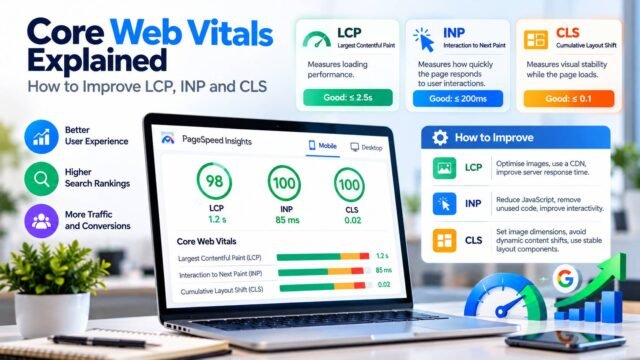
Fast, stable pages provide a better experience, and Core Web Vitals are part of how Google evaluates page experience. Key developer actions include optimising images, reducing JavaScript, using caching and a CDN and reserving space for dynamic content. Our pillar guide to Core Web Vitals covers this in depth, and our guide on what a CDN is explains how to serve content quickly worldwide.
Also make sure:
- The whole site runs on HTTPS.
- Pages work well on mobile, because Google uses mobile-first indexing.
- Intrusive pop-ups don’t block the main content.
7. International Sites and hreflang
If you publish versions of a page for different languages or regions, such as UK English and US English, use hreflang annotations to tell Google which version to show to which users. Google’s guide to localised versions of pages explains how. Each version should reference all the others, including itself, and use the correct language and region codes, such as en-GB and en-US.
If you have only one English version for all regions, you don’t need hreflang.
8. Site Architecture
- Keep important pages within a few clicks of the homepage.
- Group content into clear topics, with category or hub pages linking to related articles.
- Use breadcrumbs to show the page’s place in the site.
- Link related articles to each other naturally, which helps both users and crawlers.
9. Monitoring and Maintenance
Technical SEO isn’t a one-off task. Set up regular checks:
- Search Console: Watch the Pages (indexing), Core Web Vitals, Sitemaps and Manual actions reports.
- Crawling tools: Run a site crawler periodically to find broken links, redirect chains, missing titles and duplicate content.
- Server logs: For larger sites, review how often Googlebot crawls important pages.
- Deployment checks: Add automated tests for status codes, canonical tags and robots directives, so a code change doesn’t accidentally block your whole site.
A Developer’s Pre-Launch Checklist
- [ ] Important pages return 200 and are linked internally
- [ ] robots.txt allows crawling of public pages and assets
- [ ] No accidental noindex on production
- [ ] XML sitemap generated and submitted
- [ ] Canonical tags on every page, pointing to the right URL
- [ ] 301 redirects from any old URLs
- [ ] Unique titles and meta descriptions
- [ ] Main content and links present in the rendered HTML
- [ ] Structured data added and validated
- [ ] HTTPS everywhere, with no mixed content
- [ ] Mobile-friendly layout and good Core Web Vitals
- [ ] Search Console set up and verified
Remember: Technical SEO Supports Content
Technical SEO makes sure good content can be found and understood. It doesn’t replace content quality. Google’s guidance on creating helpful, reliable, people-first content is the other half of the picture.
Kaushal’s Note
In my view, technical SEO is one of those areas that often gets overlooked until a website starts losing visibility or important pages fail to get indexed. I particularly like the practical focus here, because getting crawlability, redirects, canonical tags and JavaScript rendering right gives good content a better chance of appearing in search results. For developers, the key lesson is to build SEO checks into the development and deployment process rather than treating them as an afterthought. Technical SEO cannot guarantee rankings, but getting the fundamentals right helps search engines access and understand the pages that matter.
Conclusion
Technical SEO for developers comes down to a few principles: make important content easy to crawl, render and index; give every URL the right status and canonical signals; use clear structure and structured data; keep the site fast and secure; and monitor continuously. Build these into your development process, and your content will have the strong technical foundation it needs to perform in search.