

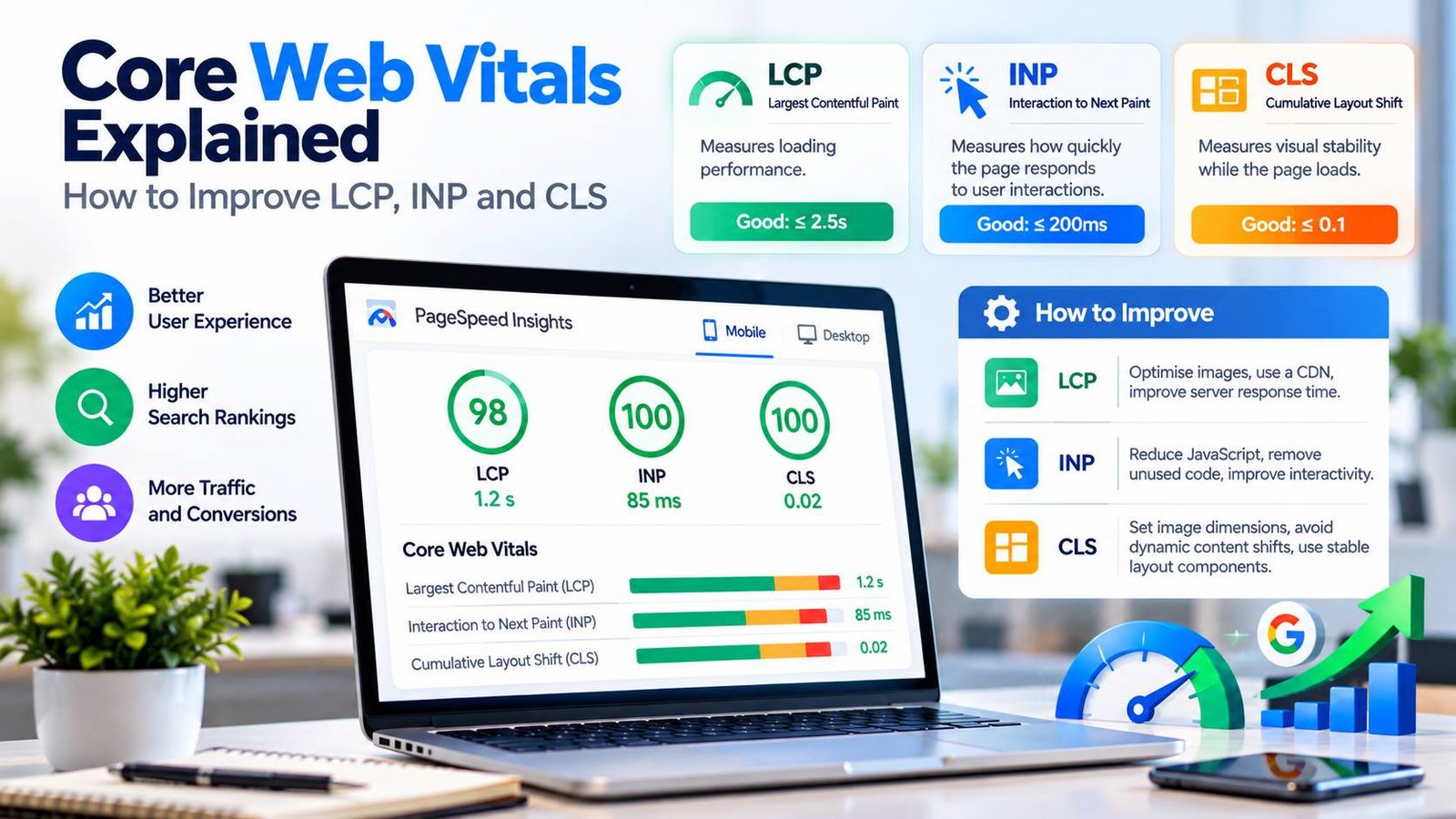
A slow, jumpy website loses visitors. People leave pages that take too long to load, get frustrated when buttons don’t respond and click the wrong link when content suddenly shifts. Google measures these experiences with a set of metrics called Core Web Vitals, and uses them as part of how it evaluates pages in search.
This guide explains what Core Web Vitals are, what “good” looks like, how to measure your own site and, most importantly, the practical fixes that make the biggest difference.
Key takeaways
- Core Web Vitals measure loading speed (LCP), responsiveness (INP) and visual stability (CLS).
- Google’s “good” thresholds are LCP within 2.5 seconds, INP of 200 milliseconds or less and CLS of 0.1 or less.
- Real user data (field data) matters more than lab test scores.
- Most improvements come from optimising images, reducing JavaScript, using good hosting and a CDN, and reserving space for content.
What Are Core Web Vitals?
Core Web Vitals are three metrics defined by Google to measure key parts of the user experience on a web page. The official reference is Google’s Web Vitals overview on web.dev.
| Metric | What it measures | Good | Needs improvement | Poor |
|---|---|---|---|---|
| Largest Contentful Paint (LCP) | How quickly the main content loads | 2.5 seconds or less | 2.5 to 4 seconds | Over 4 seconds |
| Interaction to Next Paint (INP) | How quickly the page responds to clicks, taps and key presses | 200 ms or less | 200 to 500 ms | Over 500 ms |
| Cumulative Layout Shift (CLS) | How much content moves around unexpectedly | 0.1 or less | 0.1 to 0.25 | Over 0.25 |
To pass, a page needs to meet the “good” threshold for at least 75% of page visits, measured separately on mobile and desktop. This 75th percentile rule means a page has to be fast for most real visitors, not just for the person testing it on a fast laptop.
INP replaced FID in 2024
If you have read older guides, you may see First Input Delay (FID). In March 2024, Google replaced FID with INP, which is a stricter and more complete measure of responsiveness. FID only looked at the delay before the first interaction was handled. INP looks at the responsiveness of all interactions during a visit. Many sites that “passed” FID found they needed work to pass INP.
Why Core Web Vitals Matter
For users. Faster, more stable pages are simply more pleasant to use. Visitors are more likely to stay, read and come back.
For search. Core Web Vitals are part of the signals Google’s ranking systems use to understand page experience. Google’s page experience documentation is clear that great content and relevance matter most, so a fast page with poor content won’t rank well. But when pages are similarly relevant, a better experience can help.
For revenue. If you plan to run advertising, such as Google AdSense, layout stability is especially important. Ads that load without reserved space are a common cause of poor CLS, and pages that jump around frustrate readers.
Field Data vs Lab Data
There are two types of performance data, and it is important to understand the difference.
| Field data | Lab data | |
|---|---|---|
| Where it comes from | Real visitors using your site | A simulated test on one device and network |
| Examples | Chrome User Experience Report (CrUX), Search Console | Lighthouse, PageSpeed Insights lab section |
| Strengths | Shows what users actually experience | Repeatable, useful for debugging |
| Limitations | Needs enough traffic, updates slowly | May not match real conditions |
| Used for Core Web Vitals assessment | Yes | No |
Google assesses Core Web Vitals using field data from the Chrome User Experience Report (CrUX). New or low-traffic sites may not have enough field data yet, so lab tests are useful for finding problems in the meantime.
How to Measure Your Core Web Vitals
1. PageSpeed Insights
PageSpeed Insights is the quickest place to start. Enter a URL to see real user data from CrUX (if available) and a Lighthouse lab test with specific recommendations.
2. Google Search Console
The Core Web Vitals report in Search Console groups your pages by status (good, needs improvement, poor) using field data. It is the best way to spot site-wide problems, such as all blog posts using the same slow template.
3. Chrome DevTools and Lighthouse
The Performance panel in Chrome DevTools shows exactly what happens as a page loads and responds, including long tasks that hurt INP and the elements that cause layout shifts.
4. Real user monitoring
For ongoing tracking, you can collect Core Web Vitals from your own visitors using Google’s open-source web-vitals JavaScript library and send the results to your analytics tool.
How to Improve Largest Contentful Paint (LCP)
LCP measures when the largest visible element, usually a hero image, featured image or main heading, finishes rendering. Google’s LCP guide breaks it into four parts: server response time, resource load delay, resource load time and render delay. Fix the biggest part first.
- Speed up your server response. A slow server delays everything. Use good-quality hosting, enable server-side caching and keep your database and plugins lean. Our guide to choosing web hosting explains the options.
- Use a content delivery network (CDN). A CDN serves files from locations close to your visitors, which is especially important if your readers are spread across the UK, Europe and North America. See our guide on what a CDN is and whether you need one.
- Optimise the LCP image.
- Compress images and use modern formats such as WebP or AVIF.
- Serve correctly sized images for each screen with responsive images (srcset).
- Don’t lazy-load the LCP image. Lazy loading is great for images further down the page, but it delays the main image.
- Tell the browser the image is important with fetchpriority=”high”, or preload it.
- Remove render-blocking resources. Large CSS files and synchronous JavaScript in the page head can stop the browser from displaying content. Inline critical CSS, defer non-essential JavaScript and remove unused code.
- Load web fonts efficiently. Host fonts yourself where possible, preload the most important font file and use font-display: swap so text appears quickly.
How to Improve Interaction to Next Paint (INP)
INP measures the time from a user’s interaction (a click, tap or key press) until the browser shows the next visual update. Poor INP almost always comes from too much JavaScript running on the main thread. Google’s INP guide explains the details.
- Reduce and remove JavaScript. Audit your scripts and plugins. Every widget, slider, tracking script and chat tool adds work for the browser. Remove what you don’t need.
- Be careful with third-party scripts. Advertising, analytics, consent banners, social embeds and chat widgets are common causes of slow interactions. Load them only where needed and defer them when possible. Our guide to cookie consent done right covers how to load consent tools without hurting performance.
- Break up long tasks. Any task that blocks the main thread for more than 50 milliseconds is a “long task”. Split heavy work into smaller pieces and yield to the browser between them, so it can respond to user input.
- Give immediate visual feedback. When a user clicks a button, update the interface straight away (for example, show a loading state), then do the heavier work afterwards.
- Avoid unnecessary re-rendering. In JavaScript frameworks, large re-renders after small interactions can hurt INP. Keep components small and update only what has changed.
- Move heavy work off the main thread. Web workers can handle complex calculations without blocking interactions.
How to Improve Cumulative Layout Shift (CLS)
CLS measures how much visible content moves unexpectedly while the page is in use. Google’s CLS guide lists the most common causes.
- Always set image and video dimensions. Include width and height attributes (or a CSS aspect-ratio) so the browser reserves the right amount of space before the file loads.
- Reserve space for ads, embeds and iframes. Give ad slots and embedded content a fixed minimum height. This is one of the most important steps for sites that plan to show display ads.
- Don’t insert content above existing content. Banners, notices and “related posts” boxes that appear at the top of the page after it loads push everything down. Place them in reserved space, or show them in a way that doesn’t move existing content.
- Manage web fonts. When a fallback font is replaced by a web font of a different size, text can shift. Preload key fonts and use font metric overrides or closely matched fallback fonts.
- Animate with transforms. Use CSS transform for animations instead of properties such as top or height, which cause layout changes.
Core Web Vitals on WordPress
WordPress powers a large share of the web, and its flexibility can lead to performance problems if themes and plugins aren’t chosen carefully. Practical steps include:
- Choose a lightweight, well-coded theme.
- Limit plugins to those you really need, and remove inactive ones.
- Use a caching plugin or server-level caching provided by your host.
- Use an image optimisation solution that creates modern formats and responsive sizes.
- Defer and delay non-essential JavaScript, but test carefully, because over-aggressive settings can break features.
- Keep WordPress, themes and plugins up to date, which also matters for security, as explained in our website security checklist.
If you are deciding whether WordPress is still the right platform, our comparison of WordPress vs headless CMS looks at the performance trade-offs.
Core Web Vitals and Modern Frameworks
JavaScript frameworks can produce very fast sites or very slow ones, depending on how they are used. Sending large amounts of JavaScript to the browser is a common cause of poor INP. Approaches such as server-side rendering, static generation and “islands” architecture, where only interactive parts of a page load JavaScript, can help. Our guide to Next.js vs Astro vs Nuxt compares how popular frameworks handle this.
A Practical Improvement Workflow
- Check Search Console to see which groups of pages fail and for which metric.
- Pick a representative page from the worst group and test it in PageSpeed Insights.
- Identify the main cause using the diagnostics, such as a large hero image, a slow server or a heavy script.
- Fix the biggest issue first, usually at the template level so it improves many pages at once.
- Re-test in the lab to confirm the fix.
- Wait for field data to update. CrUX data covers a rolling 28-day period, so improvements take a few weeks to appear in Search Console.
- Monitor continuously, because new plugins, scripts and content can undo your work.
Performance is also one part of a wider technical foundation. Our guide to technical SEO for developers covers the other essentials, such as crawlability, indexing and structured data.
Common Myths About Core Web Vitals
“A score of 100 in Lighthouse means we pass.” Not necessarily. Lighthouse is a lab test. Google uses real user field data to assess Core Web Vitals.
“Core Web Vitals are the most important ranking factor.” They are not. Relevance and content quality come first. Core Web Vitals are one of many signals.
“We fixed it, so we’re done.” Performance changes over time as you add content, plugins and scripts. Treat it as ongoing maintenance. A quick monthly check in Search Console is usually enough to catch problems early.
Kaushal’s note
In my opinion, Core Web Vitals are about more than just getting a good Google score; they’re about creating a smooth experience for visitors. I recommend starting with the basics: optimise images, use reliable hosting, remove unnecessary plugins and JavaScript, and keep your layout stable. Focus on fixing the biggest issues first rather than chasing a perfect score. A fast, stable and user-friendly website helps build trust and supports long-term business growth.
Conclusion
Core Web Vitals turn “is my website fast enough?” into three clear, measurable questions: does the main content load quickly, does the page respond quickly and does it stay stable? Measure with real user data, fix the biggest problems at the template level and keep monitoring. The result is a website that people enjoy using, which is good for your visitors, your search visibility and your business.